


AngelSense Guardian
4.6455.00 Reviews
App Specs
- Version
- 4.4.2
- Updated On
- License
- Free
- Downloads
- 100,000+
- Developer
- AngelSense
- Categories
- Parenting
- Platform
- Android
Screenshots
 Analysis by AppCompare
What I find most useful about AngelSense Guardian is the way location awareness can support a caregiver’s decisions without making every outing a phone call. For a child or adult who may not be able to explain where they are, or reliably use a phone, having a dedicated location-and-voice setup can make everyday handoffs easier to manage. That focus makes it different from a general family-location app, which usually assumes everyone carries and operates a smartphone comfortably.
Why live location matters beyond a map
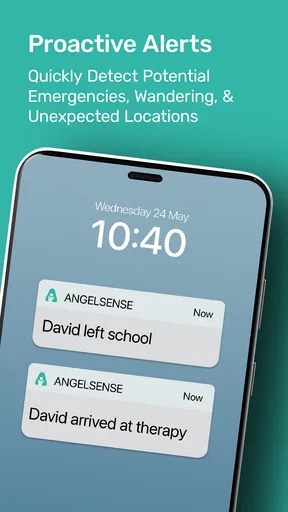
A map is only helpful when it answers a practical question: has someone reached the place they were expected to go, or do I need to check in? I would treat AngelSense as a way to reduce uncertainty around transitions, such as leaving home, arriving at school, or returning from an activity. Alerts can help caregivers notice those moments without keeping the map open all day.
The benefit is not that a location screen can replace supervision. It cannot tell you everything about a person’s wellbeing, and a location update should not be treated as proof that an environment is safe. Its value is narrower and more realistic: it can give a caregiver another useful signal, especially when the person being supported does not communicate plans or delays in the usual way.
A calmer routine for caregivers
I would set up the app around a small number of important places rather than trying to account for every possible movement. Home, school, and a regular care or activity location are often enough to make alerts meaningful. Too many boundaries can turn notifications into background noise, which defeats the point of receiving them.
Before relying on alerts, I would also decide who needs to see them and what each person should do when one arrives. A caregiver who is at work may need to contact the person responsible for pickup; someone already nearby may be able to check directly. That simple plan makes an alert more actionable and reduces the chance that several people assume somebody else is responding.
Questions to settle before depending on it
Families often want to know whether a location-and-alert app will work for their particular routine. I would test the setup during ordinary trips before treating it as part of a safety plan: check that the device is being carried, confirm that the expected arrival alerts make sense, and make sure the right caregiver notices them. A short trial can reveal whether the workflow fits the household better than discovering friction on a rushed morning.
Another sensible question is whether the person being supported is comfortable with the arrangement. Where possible, explain what the device does and why it is being used in language that suits their age and communication needs. For adults, include them in the decision rather than treating tracking as an automatic choice. The technology may help caregivers, but trust and dignity still matter.
Worth Reading Before You Choose

EA SPORTS FC Mobile 26 Is a Bigger Football Game, but It Takes Time

Flipboard Shows What News Apps Must Do Beyond the Feed

Switching to Android Auto Means Rethinking Your Driving Routine

Google Calendar Makes a Crowded Week Easier to Manage

Ludo King Makes the Most of the Minutes Between Plans

Baby Panda World Brings Quick Play to Modern Phones, but Its Game Library Feels Busy
Where a dedicated setup has limits
Compared with asking someone to share their phone location, a dedicated safety arrangement may be more appropriate when using a phone is difficult or inconsistent. But it also asks the family to manage an additional device and its routine. If the person already carries a phone, responds to calls, and can share their location willingly, a built-in phone feature may be simpler and involve less equipment.
I would not choose AngelSense solely because I wanted occasional reassurance about an independent adult who prefers privacy, or for a family that only needs to coordinate casual meetups. In those cases, a normal call or opt-in location sharing may be a better fit. The strongest reason to consider this app is a recurring care need where location awareness and direct voice communication solve a genuine daily problem.
That is also why I see it as a specialized parenting and caregiving tool rather than a general-purpose tracker. AngelSense is made by AngelSense, and its store description positions it for children and adults with special needs. The app is free to download, but that does not mean the overall service has no cost: check the current service terms before planning around it. Its Everyone age classification describes the app’s content rating, not a recommendation that every person should be tracked.
Getting Started with AngelSense Guardian
Installing the AngelSense Guardian app was a breeze. Available on both Android and iOS, I just hopped onto the app store, and bam, it was ready to roll in minutes. The app interface is super user-friendly, which is a massive win in my book. You know how some apps feel like you're navigating a spaceship? Not this one. It’s all about simplicity and efficiency.
Features That Stand Out
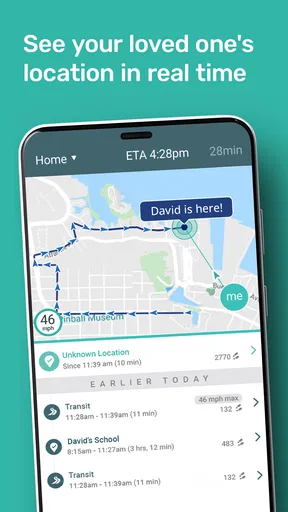
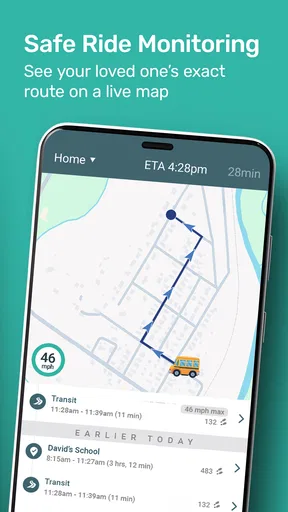
Now, let's talk features. One of the coolest things is the real-time GPS tracking. I tested it out by tracking my cousin on her way to school. It was reassuring to see her route and get notifications when she arrived safely. The precision of the location updates is impressive, and the app keeps you informed without being intrusive.
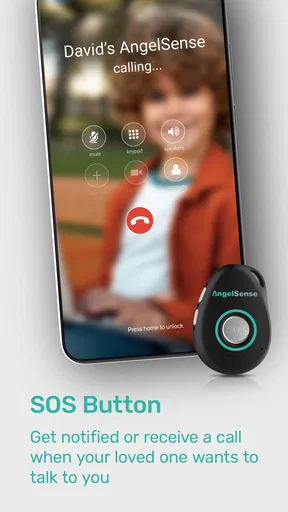
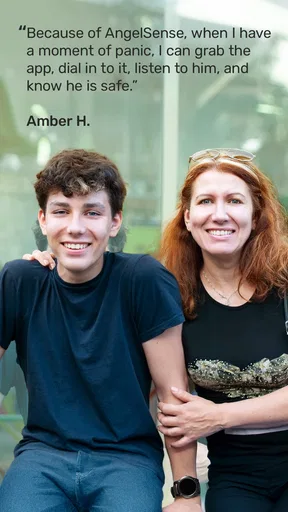
Another highlight is the voice monitoring feature. Imagine being able to call in and listen to the surroundings of your loved one without them having to pick up the phone. It's like having a superpower to ensure they're in a safe environment. I tried this feature when my grandma went for her evening walk, and it was comforting to know she was safe and sound.
Communication Made Easy
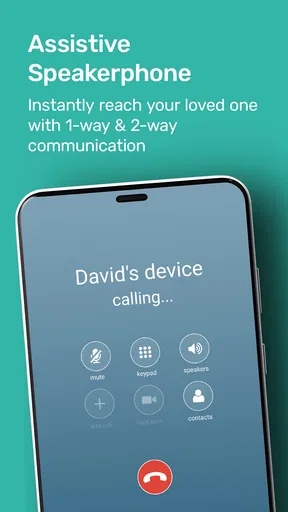
The app isn't just about tracking; it’s about staying connected. There’s a two-way voice call feature that lets you communicate directly through the device. It’s perfect for quick check-ins or when you need to send a reassuring message. I used it to remind my little brother to grab his lunch before heading out, and it was as clear as a regular phone call.
Safety Zones and Alerts
Setting up geofenced safety zones is another brilliant feature. I set up a few zones around our neighborhood and got instant alerts whenever the boundary was crossed. This is perfect for parents or caregivers who want to keep a close eye on movements without having to constantly check the app. It’s like having a digital guardian angel.
Plus, the alert system is customizable. You can choose to receive alerts via SMS, email, or push notifications. It’s all about what works best for you. I went with push notifications, and they were prompt and reliable every time.
Battery Life and Durability
Now, let's address the elephant in the room: battery life. The device paired with the app lasted a good 24 hours on a single charge, which is pretty solid. The device itself is sturdy and designed to withstand the whirlwind activities of kids or the occasional bump and fall, making it perfect for everyday use.
Subscription and Cost
While the app offers fantastic features, it does come with a subscription plan. The cost seemed reasonable to me, considering the peace of mind it provides. You get access to all premium features, ensuring a comprehensive safety net for your loved ones.
My Final Thoughts
Wrapping it up, the AngelSense Guardian app is a must-have for anyone serious about family safety. It’s loaded with features that genuinely make a difference, and the real-time updates keep you connected in ways that traditional methods just can't match. Sure, there’s a subscription fee, but considering the value and peace of mind it brings, it’s worth every penny.
If staying connected with your loved ones is as important to you as it is to me, then you definitely need to give this app a whirl. It’s like having an extra pair of eyes looking out for the people you care about most.
Making the alert routine dependable
A useful way to judge the setup is to walk through a normal transition with another caregiver before the routine becomes urgent. For example, if a child travels between home and school with a support person, agree on who checks the arrival notice and who follows up if the expected handoff changes. The alert is most helpful when it fits a clear responsibility, rather than becoming one more notification everyone assumes someone else has seen.
I would also keep the routine simple enough for busy days. Choose the alert channel the primary caregiver is most likely to notice, then avoid duplicating every event across several channels unless there is a real reason. A flood of messages can make an important change harder to spot. The goal is not to watch every movement; it is to notice the transitions that matter to your particular household.
When two-way voice is the more useful part
Location can tell you where a person appears to be, but a brief voice exchange can help with the next step: offering reassurance, giving a reminder, or checking whether a change in plans has been understood. I see that as a practical distinction from a map-only tracker. A family may not need to call often, but having a direct way to communicate through the device can be valuable when conventional phone use is not a comfortable option.
It still makes sense to agree on how and when to use that channel. If a person finds unexpected calls unsettling, frequent check-ins could create stress instead of reassurance. I would make the purpose predictable, keep messages calm and brief, and use ordinary conversation whenever possible. The best setup supports independence rather than making every outing feel like a test.
One realistic day with the app
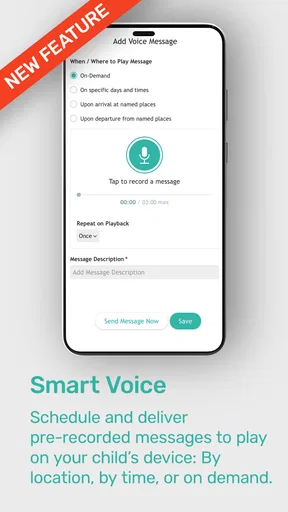
Imagine a caregiver preparing for a weekday school run while also getting ready for work. Before leaving, they confirm that the device is with the child and that the other adult responsible for pickup knows what alerts to expect. During the day, an arrival notification can help the caregiver move on to work without repeatedly calling the school or the child. If plans change later, a voice message may be more useful than trying to interpret a map alone.
That example depends on the device being carried and the adults agreeing on a response. It is not a substitute for a school’s own handoff procedures, a caregiver’s attention, or a backup plan if the device is forgotten. I would keep the usual contact numbers and pickup arrangements in place; the app works best as an additional layer, not as the only link in the chain.
Choosing between this and familiar alternatives
For a person who can comfortably carry a phone, answer calls, and share location by choice, a built-in phone location tool may be the less complicated option. It avoids adding a dedicated device to the daily checklist. A phone call or text is also often enough when the need is occasional coordination rather than ongoing support.
AngelSense is more compelling when those assumptions do not hold: perhaps the person does not reliably use a phone, needs a caregiver to notice key transitions, or benefits from a simple voice connection through a dedicated setup. Compared with a basic GPS tag, the combination of location awareness and two-way voice gives caregivers more ways to respond. That does not make it universally better; the right choice depends on the person’s comfort, routine, and support needs.
Practical checks before making it part of care
The published release history begins on June 22, 2015, and the current version is 4.2.0, with iOS 12 listed as the minimum operating system. I would check device compatibility before setting up a household, especially if one caregiver uses an older phone. The app has a 4.6 average from around 879 ratings, with over 100,000 installs, which suggests that many people have tried it, but those figures cannot tell you whether it will suit a particular care arrangement.
It is also worth separating the app download from the complete service cost. The download is free, while the experience described in the published review involves a subscription plan. I would check the current terms directly before committing, and make sure the adults who will rely on the service understand what they are paying for. That is a more useful decision than assuming “free” means every part of the setup is included.
There can be small but meaningful points of friction: remembering to charge and bring the paired device, keeping caregiver roles current when schedules change, and agreeing on who acts on an alert. Those are not reasons to dismiss the app, but they are part of its real cost in attention. A family that cannot maintain those habits may get more dependable results from a simpler, mutually agreed phone check-in.
For a caregiver weighing the choice, I would start with one question: is there a recurring moment when location information and a direct voice connection would make care safer or less stressful? If yes, AngelSense Guardian may be worth exploring as a specialized support tool. If the need is only occasional reassurance, or the person prefers not to be tracked, a less intensive option is likely the kinder and easier fit.
Pros
- Real-time GPS tracking for accurate location updates.
- Two-way voice communication for easy contact.
- Geofencing alerts to monitor safe zones.
- Detailed trip history for activity insights.
- Reliable battery life for all-day use.
Cons
- Monthly subscription fee can be costly.
- Device size may not suit all users.
- Limited customization options for alerts.
- Requires constant internet connection.
- App interface might feel outdated to some.
FAQs for AngelSense Guardian
What is AngelSense Guardian and who is it for?
AngelSense Guardian is a specialized GPS tracking app designed to ensure the safety of individuals with special needs, such as children with autism or elderly people with dementia. It offers real-time location tracking, notifications, and communication features to give peace of mind to caregivers and family members.
How does AngelSense Guardian ensure real-time tracking?
AngelSense Guardian uses advanced GPS technology to provide accurate, real-time location updates. The app continuously tracks the user's movements, sending automatic alerts to caregivers if the user enters or leaves designated safe zones. This ensures caregivers are always informed of the user's whereabouts.
What features does AngelSense Guardian offer for communication?
AngelSense Guardian includes a two-way voice feature, allowing caregivers to communicate directly with the person being monitored. This is particularly useful in emergencies or when immediate reassurance is needed. The app also supports automatic call answering, ensuring that help is readily available when required.
Is AngelSense Guardian compatible with both Android and iOS?
Yes, AngelSense Guardian is available for both Android and iOS devices. The app can be downloaded from the Google Play Store for Android users and the Apple App Store for iOS users, making it accessible to a wide range of smartphone users.
Are there any privacy concerns with using AngelSense Guardian?
AngelSense Guardian is designed with privacy in mind. It allows only authorized caregivers to access the location data and communication features. The app complies with privacy regulations, ensuring that all data is securely encrypted and used solely for the protection and safety of the user.


